
A phone can work as a note-taking tool, but only if you use it for the jobs it does well. It is excellent for capturing a whiteboard with the camera, recording a spoken explanation, and keeping a searchable list of tasks. It is poor for writing long passages by hand or typing at speed. The trick is to match each task to the right method: type short notes, photograph what is on the board, record what you cannot write fast enough, and keep everything in one place so you can find it later. Used that way, a phone becomes a practical study tool rather than a distraction.
- Type short notes, photograph the board, and record explanations rather than writing long passages.
- A small stand keeps the phone steady for reading and filming during study.
- Use one note app and one folder structure so everything stays findable.
- Keep the phone on a stand to reduce the temptation to drift into other apps.
Can a phone really replace a notebook?
A phone can replace part of a notebook, not all of it. It is hard to beat for capturing a whiteboard, photographing a page, or recording a spoken explanation you cannot type fast enough. It is weaker for long, structured writing, where a keyboard or paper is quicker and easier to review. The practical approach is to split the job: use the phone for capture and quick lists, and use paper or a laptop for the writing that needs structure. Many students find the phone is best as a companion to their main notes rather than a replacement. If you set it up that way, it adds speed and convenience without forcing you to type everything on a small screen. Use the native notes app before a third-party one, because it syncs without an extra account to set up.
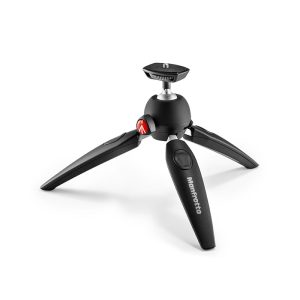
Mounts & Stands — holder. Designed for everyday carry and backed by our 30-day happiness guarantee.
How do you type notes quickly on a phone?
Typing on a phone is faster when you stop trying to write full sentences. Use short fragments, keywords, and bullet points, and leave out words you can reconstruct later. Learn a few shortcuts on your keyboard, such as swiping to type and voice dictation, both of which are quicker than tapping for many people. Voice dictation is especially useful for capturing a thought before it slips away, and it frees your eyes to watch the speaker. Set up text replacement for terms you type often, so a short trigger expands into a full phrase. And keep the notes app on the first screen so it opens instantly. The aim is speed, not elegance; you can tidy the notes afterward. Dictation is faster than typing on a small screen, and it captures a thought you would otherwise lose.
How do you capture what is on a board?
Photographing the board is one of the phone’s strongest note-taking uses, but the photo only helps if it is readable. Stand square to the board rather than at an angle, so the text is not distorted, and make sure the whole area is in the frame. Take the photo before the board is wiped, and if the board is busy, capture two or three sections rather than one crowded shot. Keep your hand and the phone’s shadow out of the frame. If the lighting is uneven, move so reflections are not covering the writing. Label the photo with the topic and date as soon as you take it, because a camera roll full of unlabeled board photos is hard to sort later. A quick photo of the board beats copying it by hand, and it is searchable later.
When does a tripod help for scanning and recording?
A tripod helps when you need the phone steady and hands-free. For scanning pages or photographing a document, a stand that holds the phone overhead keeps the camera square to the page and gives you a consistent shot every time. For recording a study session or a spoken explanation, a small tripod keeps the phone stable so the audio is clean and the frame does not shake. It also lets you work with both hands while the phone films. You do not need anything elaborate; a simple stand or a small tripod is enough. The value is in the steadiness, which turns a shaky handheld clip into something you can actually review later. Keep the phone flat on the desk while you type, because that angle is the most comfortable for the hands.

Mounts & Stands — holder. Designed for everyday carry and backed by our 30-day happiness guarantee.
How do you keep notes findable later?
Notes are only useful if you can find them again, and that means a system. Use one notes app for everything rather than scattering notes across several, and create a folder or tag for each subject. Give every note a clear title that includes the topic and the date, because a folder of notes called “Untitled” is no help at all. Photographs should be named too, so a board photo is not just another image in the camera roll. Pin or star the notes you refer to most. Back the notes up so a lost phone does not mean lost work, and consider a backup that keeps them in the cloud. For tidying up, see how to organise your phone’s home screen. Tag notes by subject the moment you make them, since sorting later is the step everyone skips.
What should you avoid when taking notes on a phone?
Avoid trying to type long passages, because you will fall behind and miss the point of the notes. Avoid switching between apps constantly, since every switch is a chance to be distracted. Avoid leaving the phone flat on the desk, where it invites glances at notifications; a stand keeps it upright and purposeful. Avoid relying on photos alone, because a camera roll of board images is not the same as notes you can revise from. And avoid filling your phone’s storage with recordings you never review, since a full phone slows down and forces awkward choices later. If space is tight, see managing phone storage: what to delete first.
Frequently asked questions
- Is a phone good enough for note-taking? For short notes, photos of the board, and recordings, yes. For long structured writing, paper or a laptop is usually quicker.
- What is the best way to capture a whiteboard? Stand square to the board, take two or three photos of sections rather than one crowded shot, and label each with the topic and date.
- Does a stand really help? Yes. It keeps the phone steady for filming and reading, and it keeps the phone upright so you are less tempted to drift into other apps.
- How should I organize phone notes? One app, one folder or tag per subject, and a clear title with the topic and date on every note and photo.
- What is the biggest mistake? Trying to type everything. Use fragments, voice dictation, and photos, then tidy the notes afterward.


